I AM the system administrator. Who do I call?
SalesForce SSO with ADFS 2.0 – Everything you need to Know
Intro
In my last post I went over the basic concept of federation using SAML 2.0, today I’ll show you how to configure single sign-on for SalesForce using ADFS 2.0. This is a really nice solution because it’s easy to set up and doesn’t cost you anything except the Windows 2008 OS licence.
ADFS 2.0 is Microsoft’s answer to federation – it includes their own implementation of SAML 2.0. It runs on Windows Server 2008 [R2] and is installed from a separate downloadable package. It is not the ADFS ‘role’ which can be enabled in Windows Server 2008 R2, that’s ADFS 1.0 (not cool).
If you don’t feel you have a good grasp of SAML 2.0 I suggest that you set up ADFS 2.0 (as IdP) and Shibboleth (as SP) in a lab environment. There’s no better way to learn about a particular technology than to interface Microsoft’s implementation with its open source counterpart! There’s a great MSDN blog post that walks you through the set up. I really learnt a lot by doing this.
Overview
Let’s first take a look at an overview of the process then we’ll dive into the configuration. The diagram below shows the process for an IdP-initiated login into SalesForce – later we’ll look at SP-initiated login.
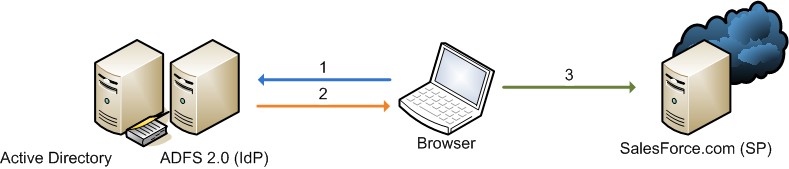
- The user authenticates to the ADFS server using Kerberos and requests login to SalesForce
- ADFS returns a SAML assertion to the user’s browser
- The browser automatically submits the assertion to SalesForce who logs the user in
Install
- Start with Windows Server 2008 [R2] – Domain Joined
- Create a friendly DNS name for ADFS and point it to your adfs server. e.g adfs.testzone.local
- Download and install ADFS 2.0. Federation Server role. This will install all pre-requisites
- In the IIS manager create an SSL certificate for your friendly DNS name or use SelfSSL from the IIS 6.0 resource kit to create a self-signed certificate
- Run through the ADFS Server configuration wizard
- Create a new federation Service
- Stand-alone server
- Select the certificate that you created for your friendly DNS name
- Create an SPN for the DNS name so that Kerberos authentication between the browser and the ADFS IIS instance works correctly
setspn -a HOST/adfs.testzone.local testzone\ADFSSVR01 setspn -a HOST/adfs testzone\ADFSSVR01
For more info on Kerberos SPNs see my Active Directory and Kerberos SPNs Made Easy post
Configuration
To build a federation between two parties we need to establish a trust by exchanging some metadata. The metadata for our ADFS 2.0 instance is entered manually into the SalesForce configuration. SalesForce metadata is downloaded as an XML file which ADFS 2.0 can consume.
SalesForce Configuration
In the ADFS 2.0 MMC snap-in select the certificates node and double click the token-signing certificate to view it.
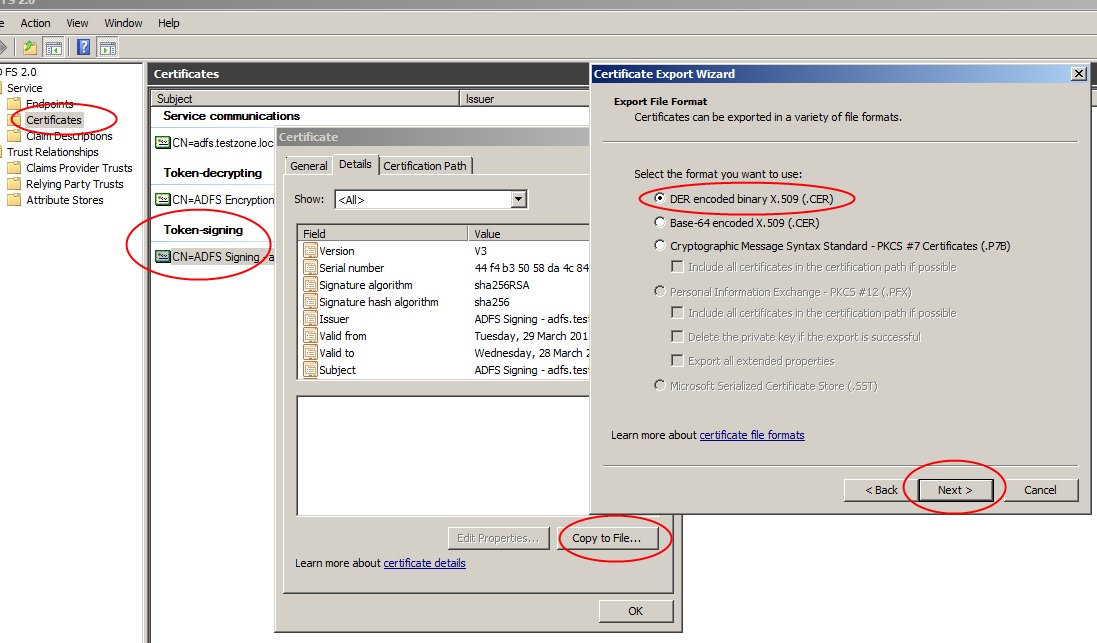
Go to details and “Copy to File”. Save the certificate in DER format.
On the ADFS server browse to your federation metadata URL which can be found in the ADFS MMC\Endpoints|Metadata|Type:Federation Metadata. In my case: https://adfs.testzone.local/FederationMetadata/2007-06/FederationMetadata.xml
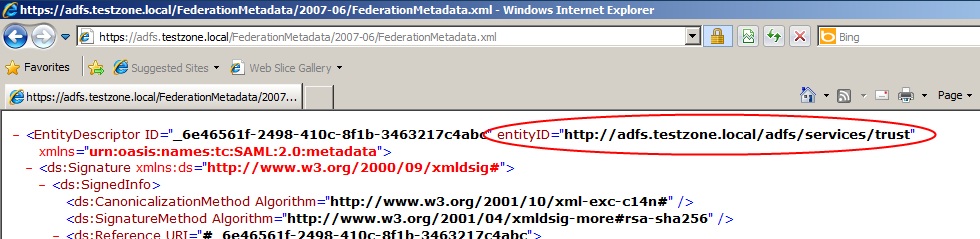
Copy the entityID. In my case http://adfs.testzone.local
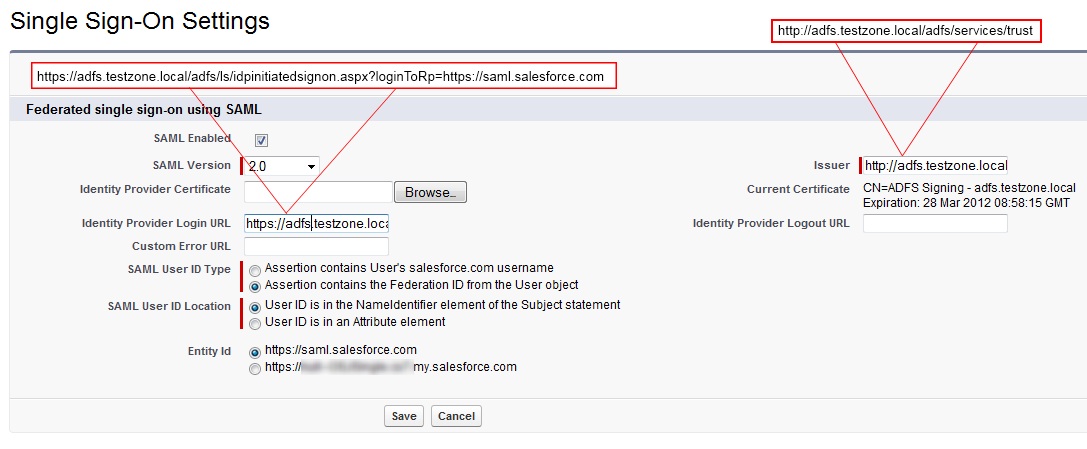
Go to SalesForce Setup\Security Controls\Single Sign-On Settings\
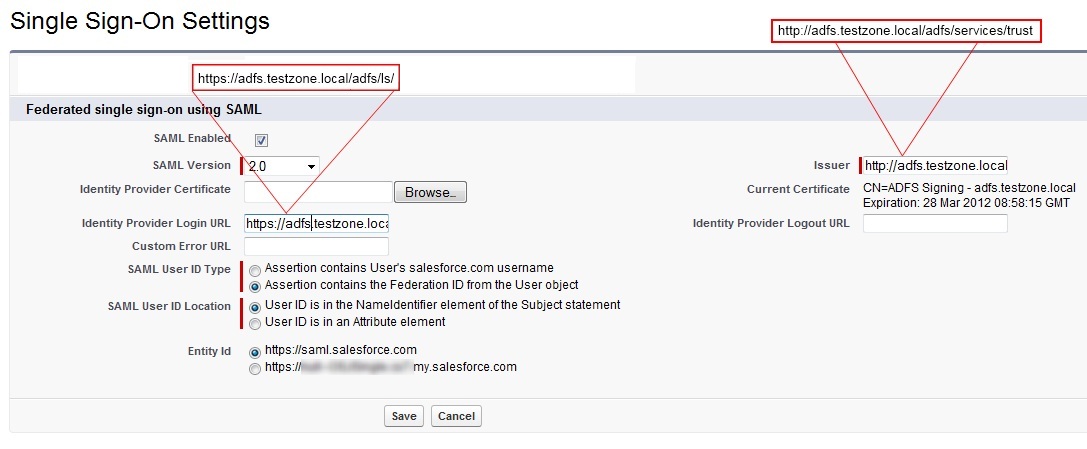
- SAML Enabled: Ticked
- SAML Version: 2.0
- Identity Provider Certificate: Browse and select the token-signing certificate you exported earlier
- Issuer: Paste your entityID in here
- Identity Provider Login URL: This is the URL of your ADFS SAML endpoint where SalesForce will send SAML requests for SP-initiated login. This can be found in ADFS MMC\Endpoints|Token Issuance|Type:SAML 2.0/WS-Federation (In my case: https://adfs.testzone.local/adfs/ls/ )
- SAML User ID Type: To log a user on we can either match against their SalesForce username or we can match against their federation ID which would need to be populated in the profile of every user. For testing select federation ID. If your users currently use their email address as their SalesForce username then when you come to roll out SSO into production you can switch to sending the username.
- SAML User ID Location: To log the user on we can either use the NameID in the SAML assertion or we can use some other attribute. NameID should suffice.
- Entity ID: This is how our ADFS IdP will identify the SalesForce SP. I just left it as https://saml.salesforce.com. If you were supporting multiple SalesForce instances from the same ADFS instance then you’d want to use the more unique name. This is also the identifier we use when we do a IdP-initiated login with ADFS
Save the settings and download the Metadata xml file.
ADFS 2.0 Configuration
Now that we have the metadata for SalesForce we can create the trust on the ADFS side.
Open the ADFS 2.0 MMC snapin and add a new “Relying Party Trust”:
- Select Data Source: Import data about a relying party from a file. Browse to the XML you downloaded from SalesForce
- Display Name: Give the trust a display name e.g. ‘SalesForce Sandbox’
- Choose Issuance Authorization Rules: Permit all users to access this relying party
- Open Edit Claim Rues Dialog: Ticked
In the claim rules editor select the “Issuance Transform Rules” tab
Add a new rule:
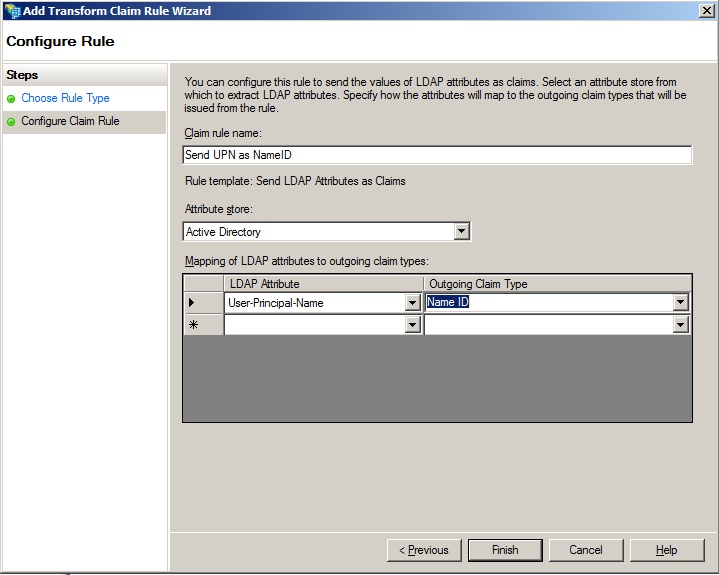
- Claim Rule Template: Send LDAP Attributes as Claims
- Claim Rule Name: For testing we’ll send the UPN as NameID so call the rule: “Send UPN as NameID” In production you might send the user’s email address or employee ID *
- LDAP Attribute: User Principal Name
- Outgoing Claim Type: Name ID
*Update:See my post on choosing you’re attributes wisely. There’s a potential security pitfall here.
SP-Initiated Login
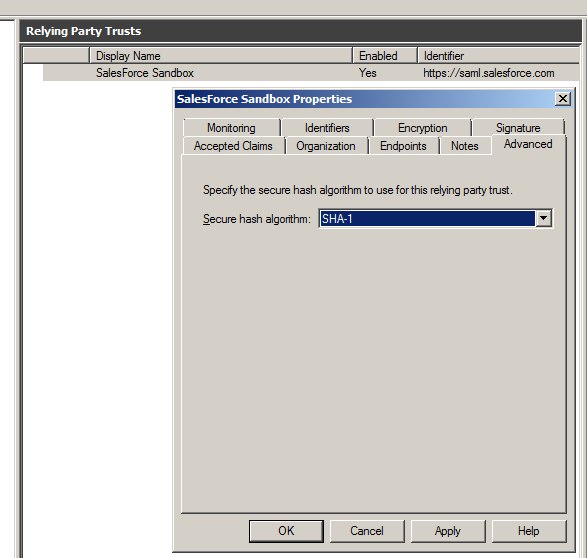
With IdP-initiated login you would typically set up a link on the company intranet that users would click to get access to SalesForce. SP-initiated login happens when a user clicks a direct link to SalesForce. For this to work we need to set the secure hash algorithm to SHA1 instead of the default SHA-256. This is set in SalesForce relying party trust properties under advanced.
If you don’t set this you’ll get the following message in to the ADFS event log:
Event ID: 378
SAML request is not signed with expected signature algorithm. SAML request is signed with signature algorithm http://www.w3.org/2001/04/xmldsig-more#rsa-sha256 . Expected signature algorithm is http://www.w3.org/2000/09/xmldsig#rsa-sha1
With My Domain
It’s best practice to implement the “My Domain” feature at the same time as implementing SSO if you haven’t already done so. “My Domain” gives you your own subdomain on SalesForce. e.g. MyCompany.my.salesforce.com. When you click a “My Domain” link SalesForce will know to redirect you to your Idp (ADFS) to be authenticated.
Without My Domain
As long as the user has performed at least one IdP-initated login from a given browser SalesForce will have set a cookie so in future it knows to redirect the browser to the IdP with a SAML request. The IdP will in turn issue a SAML response for the browser to pass back to SalesForce.
You might find some SalesForce documentation that mentions the ssoStartPage attribute which can be set in the SAML assertion. I found that this wasn’t necessary, and if you look at the cookie you get after an IdP-initiated login you’ll see that ssoStartPage is set to the IdP login URL you specified in the SalesForce SSO configuration.
LogoutURL
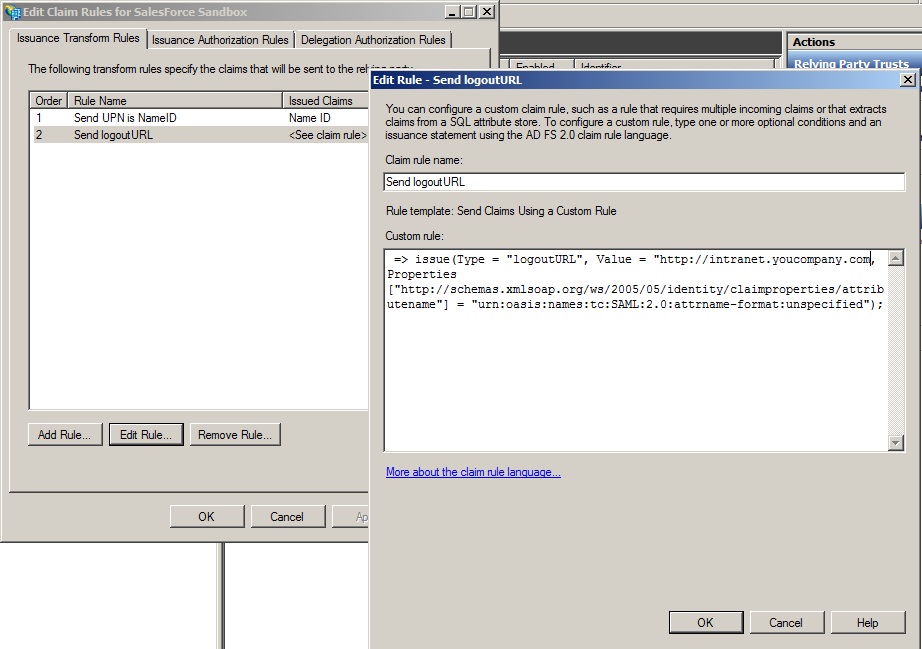
You can specify a URL to redirect to when the user logs out by creating a custom claim rule which sends an additional logoutURL attribute.
The custom rule is as follows:
=> issue(Type = "logoutURL", Value = "http://intranet.youcompany.com", Properties["http://schemas.xmlsoap.org/ws/2005/05/identity/claimproperties/attributename"] = "urn:oasis:names:tc:SAML:2.0:attrname-format:unspecified");
Testing
Alright, so that should be about it. We can now go and set the Federation ID of a SalesForce user to the UPN our own AD user account and see if it all works.
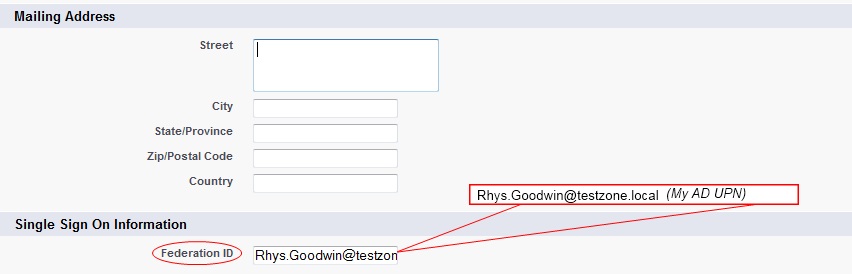
Point your browser to your ADFS IdP-initiated login URL and specify the loginToRp parameter as the SalesForce SAML entity ID.
E.g. https://adfs.testzone.local/adfs/ls/idpinitiatedsignon.aspx?loginToRp=https://saml.salesforce.com
This should redirect you and sign you into SalesForce. If you get a SalesForce login error use the SAML assertion validator tool on the SalesForce single sign-on configuration page. It will display the results of the last failed SAML login.
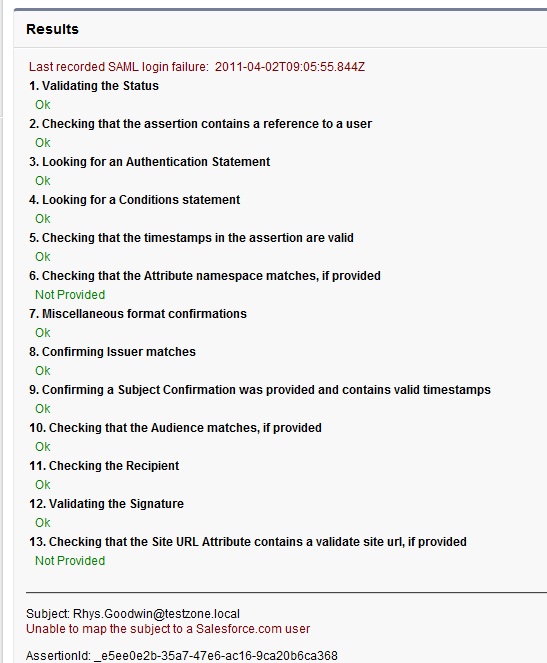
If you get an error from ADFS then check the ADFS logs in Server Manager\Diagnostics\Applications and Services Logs\ADFS 2.0\Admin. There is also a very good MSDN blog post on ADFS 2.0 diagnostics.
Once you have IdP-initiated login working try SP-initiated. Copy a link from deep inside SalesForce then log out. Reload your browser and paste the in the URL. You should be seamlessly redirected to your IdP, authenticated and then redirected back to the link you requested.
Portal SSO and JIT Provisioning
There’s plenty of good info in the Force.com literature for portal SSO and just-in-time provisioning but here’s some ADFS 2.0 specific stuff. I’ve only been playing with this for a couple of weeks but I’ve had requests for the info so here’s what I’ve got so far. Let me know if I’ve missed something or I’ve got something wrong.
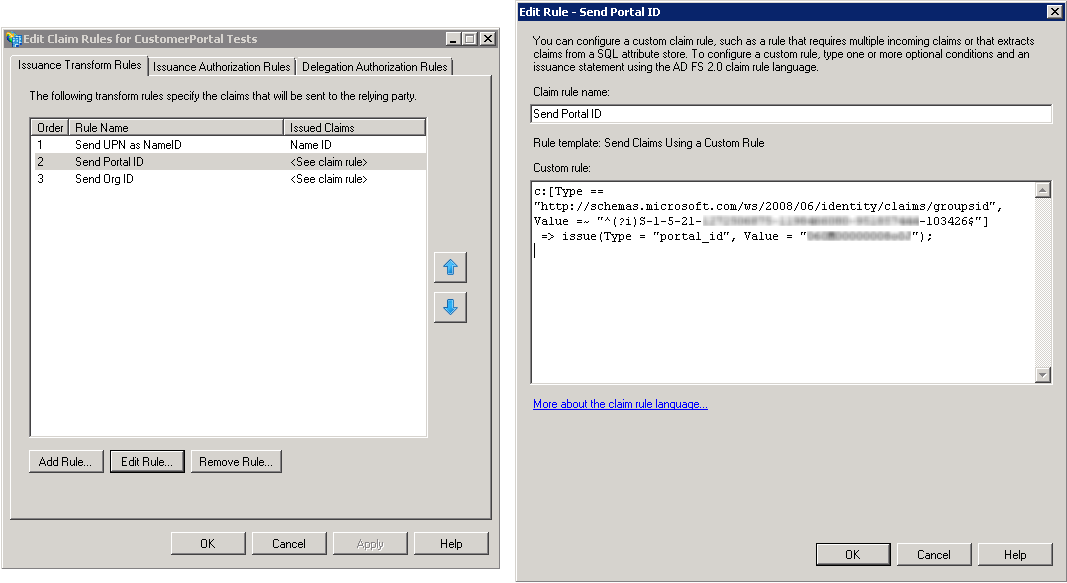
Portal SSO
To do a Portal SSO login you need to send the portal ID and the Org ID as claims using custom claims rules. There is significant caveat though, if you’re using ADFS to do SSO for both full-License and portal users. If you send the Portal ID and the Org ID for a full-license user SalesForce will assume you are trying to log into a portal. This will result in a SAML error because a full-license user can’t also be a portal user. To overcome this you can use a condition in the custom rule so the portal ID and Org ID are only sent if the user is a member of a given Active Directory group. The rules below use the AD group SID which you can find using pstool psgetsid.exe. The advantage of using an SID is that if the group is renamed the SID stays the same.
Send Portal ID
c:[Type == "http://schemas.microsoft.com/ws/2008/06/identity/claims/groupsid", Value =~ "^(?i)S-1-5-21-1458536374-0499464381-951853424-103426$"] => issue(Type = "portal_id", Value = "033G00000002a1P");
Send Org ID
c:[Type == "http://schemas.microsoft.com/ws/2008/06/identity/claims/groupsid", Value =~ "^(?i)S-1-5-21-1458536374-0499464381-951853424-103426$"] => issue(Type = "organization_id", Value = "01GK00000004ra2");
I haven’t found a way to send send a claim only if a user is not a member of a group, and the ADFS 2.0 claims rules language reference is non-existent! If someone works this out please let me know.
JIT Provisioning
Just-in-time provisioning allows you to create users on the fly with a SAML assertion as they attempt to login. All you need to do is enable JIT in your SSO settings and then send the required attributes. JIT custom claims rules are just like the portal ones above. The SalesForce Single Sign-On Implementation Guide has all the details on what attrbiutes to need to be sent. Here’s a few things to keep in mind:
- You can provision and update users into specific profiles or rolls based on Active Directory groups just like with the portal logins above, but you’ll need to manage the AD groups carefully – you couldn’t have a user in multiple groups which represent different SalesForce profiles or rolls
- You can provision and update users but you can’t un-provision them. Again you’ll need to use Active directory security groups to determine who can be JIT provisioned and you’ll have to manage your licensees and account De-activations outside JIT
JIT can’t be used to provision Portal accounts!*Update* It looks like this has changed and it is now supported. Thanks Tim for pointing this out!
https://login.salesforce.com/help/doc/en/sso_jit_portal_requirements.htm
- I found that I couldn’t JIT provision users if chatter wasn’t enabled – still waiting for the word on this from SalesForce
Further Analysis
In case you’re wondering how the browser collects and passes these SAML requests and responses around, we’ll take a closer look at the entire process.
We’ll go over the SP-Initiated login because it has the most steps and really demonstrates SAML and federation at its best. I’ll use screen shots of Fiddler2 to show you exactly what’s happening at each step.
Note* Fiddler messes with Windows integrated authentication to IIS so you’ll need to turn off extended protection on the /adfs/ls/ virtual directory if you want to try this. Otherwise your browser won’t authenticate with ADFS and you’ll see event 4625 with error 0xc000035b in the Windows security log on the ADFS server.
Step 1
The user clicks a direct link to a SalesForce page. The browser connects and SalesForce reads the ssoStartPage attribute from the user’s cookie. SalesForce uses JavaScript to redirect the browser to the SalesForce SAML request generator. The SAML request generator creates a SAML request for the IdP by sending an invisible HTML form with hidden fields back to the browser. It then uses JavaScript to automatically submit the form to the IdP SAML endpoint.
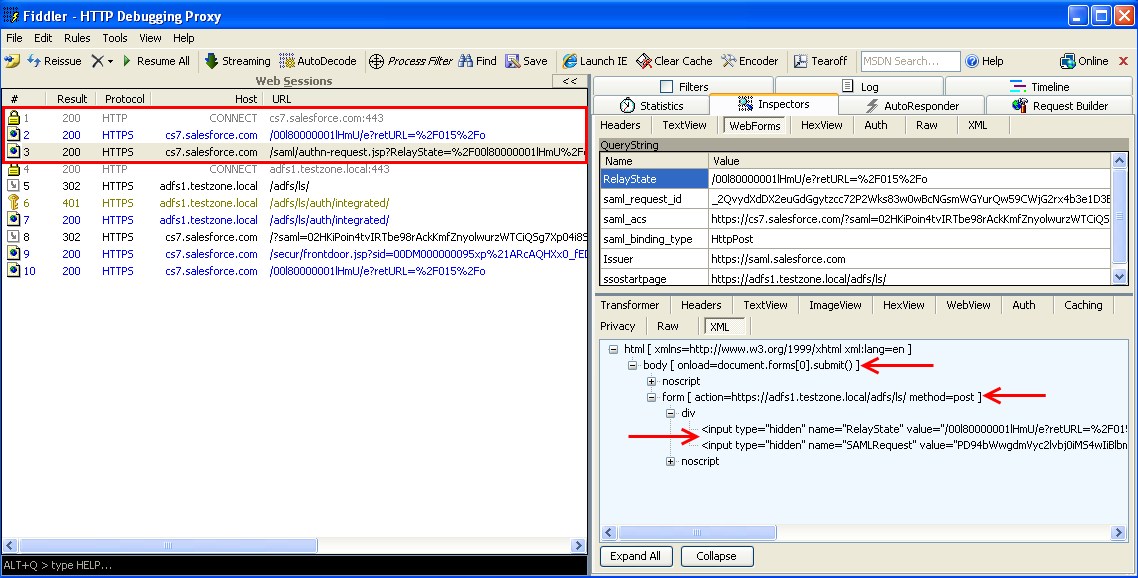
Step 2
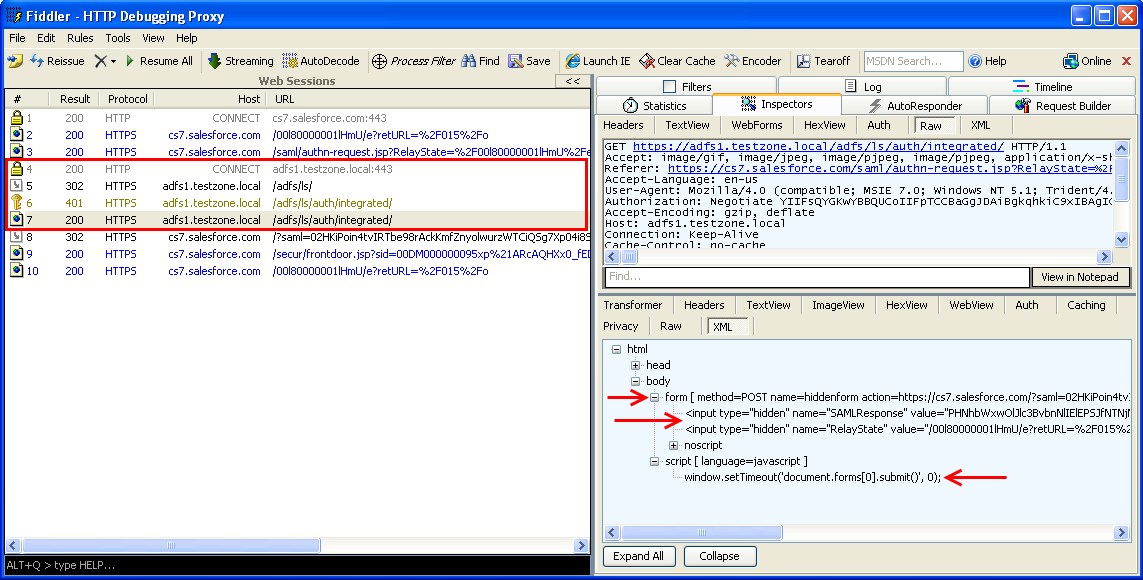
The browser submits the HTML form which contains the SAML request to the ADFS SAML endpoint. Since we are using Windows integrated authentication, ADFS redirects the browser to the /auth/ingetrated/ directory at which point a 401 (User must authenticate) is sent. Finally, the user is authenticated using Kerberos and ADFS serves up a SAML response. Again, the SAML message is returned to the browser in an HTML form which is then submitted to the SalesForce SAML endpoint using JavaScript.
Step 3
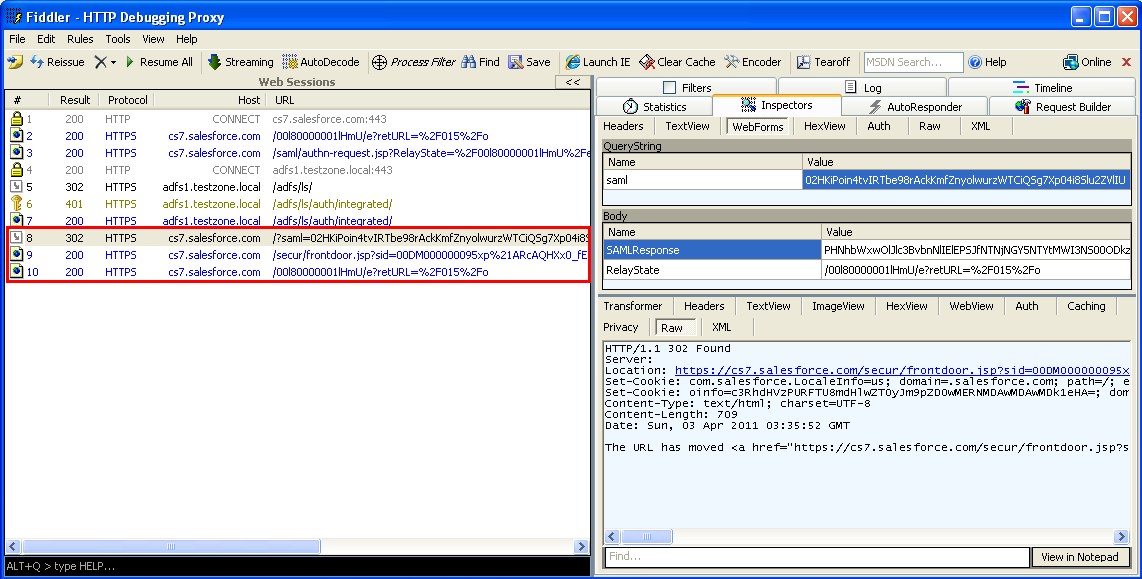
The browser submits the HTML form which contains the SAML response to the SalesForce SAML endpoint which verifies the SAML assertion, logs the user in and redirects the browser to the original requested URL.
Common Issues & Troubleshooting
Here are some of the issues you might com across. Thanks to everyone who has commented and shared their experience – I’ll keep updating this section.
Federation ID is case sensitive
One thing to watch out for is the Federation ID is case-sensitive. So if this is your organizational email, be sure to enter it exactly as AD FS sends it, or Salesforce won’t be able to find the matching user.
I’ve looked into writing a custom claim rule to normalize the case the lase of the LDAP attribute before sending it but it looks like it’s not possible the claims language doesn’t seem to have any string manipulation except a basic regex replace.
Assertion Expired
An assertion’s timestamp is more than five minutes old.
Note: Salesforce does make an allowance of three minutes for clock skew. This means, in practice, that an
assertion can be as much as eight minutes passed the timestamp time, or three minutes before it. This amount
of time may be less if the assertion’s validity period is less than five minutes.
So make sure your clock as sync’d to a good internet time source.
Conclusion
Well that’s it! Everything you need to know about SalesForce WebSSO with ADFS 2.0.
Federation is really cool, so make sure you encourage its use in your organisation instead of older methods involving clunky tightly coupled links and horrible things like allowing your cloud vendor to do LDAP authentication against your domain controllers over VPNs etc!
Thanks for reading and please ask questions, make comments and corrections. I’ll continue to update this post as we go.
Updates
2011/07/30
- Added JIT and Portal SSO info
- Updated SP-initiated login with ”My Domain” info – Thanks to Pat over at SalesForce for helping out this this
| This entry was posted by RhysGoodwin on April 4, 2011 at 1:57 am, and is filed under Cloud. Follow any responses to this post through RSS 2.0. You can leave a response or trackback from your own site. |


about 2 months ago
Rhys, you mention that you can’t do JIT provisioning for portals, but this help article from Salesforce seems to suggest otherwise: https://login.salesforce.com/help/doc/en/sso_jit_portal_requirements.htm
Is JIT provisioning a feature that has come out since you wrote that or is this a feature that you tried and found out it isn’t supported after all?
about 2 months ago
Hi Tim, from memory I tested this and had it confirmed by SalesForce at the time. so I think this must be a new development. Thanks for pointing it out. I’ve updated the post.
We actually ended up implementing our own JIT provisioning solution. Users first hit an in-house app that checks if they already have an account and if they don’t it will create one for them using the SFDC API. The reason we did this is because we needed to take the user through a few steps to make sure that the details we had for them were correct before we created an account for them. Also email is an mandatory field for creating accounts but we don’t have email addresses for all our users in AD so this method allows us to gather that information from the user.
Cheers,
Rhys
about 2 months ago
Hi,
I am having a issue regarding login on salesforce authenicated sites.
My scenario is :
I have two org1 and org2 org.We need test1 standard user of org1 can login on org2′s authenicated sites. Test1 user have the same username in org2 as it in org1.
Is it possible with adfs 2.0. ?
I used your blog to do.but when i am login on authenicated sites using idp .I am getting error.
Error : There was a problem accessing the site. Try to browse to the site again.
If the problem persists, contact the administrator of this site and provide the reference number to identify the problem.
Please help me to resolve the problem.
Thanks in advance
Pradeep Kumar
about 2 months ago
Hi Pradeep, I don’t have any experience with multiple orgs or sites. I will need to some more information:
-Would it be correct to say that test1 is an Active Directory user who has a salesforce account in org1 and org2 these are 2 separate accounts with the same username?
-I have a feeling that SalesForce doesn’t support SP initiated login for sites. Have you read this document:?
https://login.salesforce.com/help/doc/en/salesforce_single_sign_on.pdf
-Are you sending the the correct attributes in the assertion?
-Can I assume that you’re not trying to use SalesForce as an Idp only ADFS 2.0?
Cheers,
Rhys
about 2 months ago
Hi,
Thanks you Rhys for quick replay.Yes I am Using adfs 2.0 as Idp.
Now I am able to Login On sites .But now the problem is that My org1 have a link with Url of Idp like https://adfs.testzone.local/adfs/ls/idpinitiatedsignon.aspx?loginToRp=https://saml.salesforce.com .By Clicking on that Link it is redirect me on the org2 sites . But first it ask me to login on adfs idp server with username and password.
Is it possible that we can pass the username and password of active directory user in URL ? Or can we change some code in idpinitiatedsignon.aspx cs file.
So that it never ask me to login on adfs idp.
Please help me
Thanks in advance
Pradeep Kumar
about 2 months ago
Hi Rhys,
when Adfs Idp redirect browser to sites it add /secur/frontdoor.jsp in frony of sites url which is not needed. I don’t want it should add .Please suggest me the solution .
Thanks in Advance
Pradeep Kumar
about 2 months ago
Hi Pradeep, are you using ADFS 2.0 for the SSO on to org1? I have a feeling that you’re not going to be able to do what you need using ADFS 2.0.
If you are using internet explorer you shouldn’t be prompted ADFS for a username/password. There are a number of things that could cause this. Have you done kerberos configuration?
Also the ADFS server needs to be classified in the local intranet zone to send your credentials. All of this about sending your domain credentials using Kerberos NOT send a username and password which was entered at a salesforce login page. I might be able to give you more advice but you’d need to give me more of an overview of your environment.
Cheers,
Rhys
about 2 months ago
Hi Rhys,
Thanks for the reply.
My actual requirement Org1 should have a link .By click on that link Org2′s sites should open a new window and the Org1′s standard user should logged in on org2′s sites.Because Org1′s user have the same username as it in Org2′s user object field like identifier.
I have used your blog to do ADFS server to Org2′s Sites.
But ADFS Server and Org2′s sites takes authentication when we click on link in Org1. I used domain name of Org2 as a link in Org1. ADFS server ask for the Username and password first time only.
I want ADFS server and Sites should not ask for the Login as Org1′s Username same with Org2′s User Identifier Field.
Can I use ADFS Server proxy for Forms Authentication on ADFS Server ?
I used Org2 is metadata File in Relying party trust.
What types of settings i should done?
I did not do anything kerberos configuration.
Please suggest me the best way to do this.
Thanks in advance
Pradeep kumar
about 2 months ago
Hi Pradeep,
Having the same username and password between orgs won’t help.
You have ADFS 2.0 / SSO working for org1 and now you want it to work for org2 as well. Correct?
You’ve got several different issues here and some more which you’ll discover once you solve these ones I’m sorry to say.
One major problem is that ADFS 2.0 won’t let you have more than one relying party with the same signing certificate which means you won’t be able to have org1 and org2 set up separately with 2 separate idpinitiated urls. Only way around this that I know of is to have a separate ADFS 2.0 servers.
You need to understand then and configure the kerberos SPNs. Have a look at this post for starters:
http://blog.rhysgoodwin.com/windows-admin/active-directory-and-kerberos-spns-made-easy/
You need to understand IE zones and configure them via GPO if you want IE to play nicely.
Have a look at this post:
http://blog.rhysgoodwin.com/windows-admin/ie-gpo-zone-templates-and-the-open-file-security-warning/
Know that integrated login between IE and the ADFS server won’t happen seamlessly if the ADFS server isn’t part of the local intranet zone.
I still don’t know much about your environment.
After all this I suspect that what you really need is not ADFS 2.0 but to use org1 as an Idp for org2. I don’t have any experience with this but I know it’s possible.
Cheers,
Rhys
about 6 months ago
Hi,
Could you please do a write up on Google SSO with ADFS 2.0
about 5 months ago
Hi Sunil,
Yeah I’d be happy to do that when I’ve got some time. Not sure when that will be though.
Cheers,
Rhys
about 6 months ago
Hi Rhys,
Thanks for writing an excellent post. I have incorporated ADFS 2.0 in web app? I was wondering if ADFS supports form post to another secure site? I have a scenario where site 1 post post form to site 2 but since site 2 is re-authenticated, the form post gets lost. Thanks.
about 6 months ago
Hi Dilip,
I’m don’t fully understand your question but I think what you’re saying is: if you post data to a site that the user hasn’t yet authenticated to using ADFS, what will happen to the data? I would say that this would have to be handled by the application itself. One option is to stuff the data into cookies so that when the user comes back after authentication the data can be retrieved. The problem is that some browsers (safari) have very small cookie data limits. Another option is to store the data server side. But you’d have to think twice about this solution in a load balancing situation where the user might not always hit the same server. Of course all this assumes that the app you’re dealing with is your own and you can modify it.
Cheers,
Rhys
about 6 months ago
Hi Rhys,
Great article. We have an SSO project starting up. Traditionally we were writing code for authenticate and create saml tokens. Now with ADFS2.0 I am very much inclined to use this since it’s a no code solution. I want to know thought if it’s a viable solution.
My use cases -
1. User goes using browser to https://company.my.salesforce.com.
2. User can use Salesforce Chatter app , Mobile devices, and browsers ( IE, FF, Safari, Chrome )
3. User should be able to redirect to the login URL and perform SSO.
4. Our ADFS end point will be external ( internet facing ).
5. User can be within company network or outside company network. If latter then needs to be challenged for credentials before SSO can happen.
Will all of the above requrements get met ( chatter, multiple browsers , mobile devices etc ) using ADFS2.0 as the solution ? I know with FF and Safari users might get challenged but want to know if multiple browsers are OK as it’s a must for us.
If you have any tips beyond the article please share.
Thank you
BG
about 6 months ago
Hey Gandhi,
I’m interested to here about your SAML code. .NET? Are you only doing Idp-initiated logins or are you actually acting as a SAML 2.0 endpoint and handling SAMLRequests? Anyway on to your questions:
1.Yep this will do an SP initiated login – ‘redirect’ browser to ADFS so a SAML assertion can be generated. Deep links inside SFDC work too.
2. Chatter app? I’ve not tried this but I’ll put it on my list of things to test. Is this a desktop and a Mobile (Android/iPhone) app? Safari is not so good. Idp-initiated login works but a cookie size limit essentially makes it incompatible when doing SP-initiated login. See the discussion Dan and I have been having below. – No solution yet.
3. I don’t understand the question sorry.
4. I’m using MS ISA Server 2006 reverse proxy for this but it brings it’s own set of problems. I’m thinking of publishing an ADFS proxy to try it out.
5. What you’re asking for is forms based authentication from the internet and integrated (Kerberos) from inside the network. You should be able to do this. Again I use MS ISA 2006 for this but I’m guessing it would be possible with ADFS proxy.
Again I’m keen to hear about your current solution too.
Cheers,
Rhys
about 6 months ago
Hi all,
I’ve run into another issue attempting to deploy ADFS 2.0 into production. I was hoping somebody may have some insight into the errors as I can’t seem to find much about them any where. Please note I had this working fine on a development server and development edition of SFDC.
I’ve done the exact same install as I did before in production however now I’m getting errors in the ADFS Event Viewer.
To throw the errors:
Navigate to: https://mycompany.my.salesforce.com/
This throws the vague ADFS error: ‘There was a problem accessing the site. Try to browse…….Reference number: 294fc148-c62c-4c79-87a8-5d62c7001bfa ‘
When I view the ADFS Event Log I can see four errors, they are all event ID: 364. The first says something like this: ‘Encountered error during federation passive request…….. at Microsoft.IdentityServer.Web.FederationPassiveAuthentication.GetPassiveEndpointAbsolutePath()’, the last says something like: ‘Encountered error during federation passive request……..at Microsoft.IdentityServer.Web.FederationPassiveAuthentication.GetIssuerFriendlyName()’
Also note I’ve turned on tracing but don’t see any errors come through when I attempt this. However when restarting the service I see one Event debuggin error which I’m not sure is relevent: ‘CreateFromCurrentConfiguration: Unable to read Winhttp configuration. Using direct connection’
Thanks everybody, once again thanks for the blog Rhys,
Chris
about 6 months ago
Hi Chris, on my phone just now but one thing to check quickly is that you have a backslash in your config at sfdc I.e. /adfs/ls/ not /adfs/ls
about 6 months ago
Rhys, thanks for the quick reply. I’ve checked the config at SFDC, it appears to be correct. These are my settings:
Federation Service Properties:
Federation Service Display Name: SERVERNAME.mycompany.co.nz
Federation Service Name: SERVERNAME.mycompany.co.nz
Federation Service identifier: http://SERVERNAME.mycompany.co.nz
SFDC Config:
Issuer: http://SERVERNAME.mycompany.co.nz/adfs/services/trust
Identity Provider Login URL: https://adfs.mycompany.co.nz/adfs/ls/
Due note: adfs.mycompany.co.nz points to SERVERNAME.mycompany.co.nz
Thanks for your help. I’ve got a feeling I’m missing something with the certificates. However they appear to mimic my dev settings. I also wonder if I’ve done something incorrectly with IIS, port 443 was already taken by another site so I moved the /adfs/ls dirs to the 443 site from the ‘default’ web site and recreated the applications. Once again I did this in dev with no problems. Another issue I’m thinking may be the fact that I’ve not deployed ‘my domain’ within SFDC. However once again I did not do this step in dev and it worked fine so I assumed I could do this later.
When I restart the ADFS service I get an Event ID error of 67 in ADFS tracing that states ‘CreateFromCurrentConfiguration: Unable to read Winhttp configuration’.
I can navigate to these urls fine:
https://adfs.mydomain.co.nz/federationmetadata/2007-06/federationmetadata.xml
https://adfs.mydomain.co.nz/adfs/services/trust/mex
Sorry to overwhelm I just assumed if you’re putting the effort in to assist the least I can do is provide you with as much information as I can find.
Cheers,
Chris
about 6 months ago
Hey Chris, yeah I’m not too sure what’s happening here. Are you able to do an Idp Initiated login? Also did you do your MyDomain config before or after you did your SAML config? Either way just try to turn off SSO in SFDC then turn it back on and re-download the metadata. Then delete and re-create the relying party again. Another thing to check with regards to dev/prod environments – are there different group policies applying to the prod server which didn’t apply to the dev server?
Cheers,
Rhys
about 6 months ago
Rhys, sorry for the late reply, I’ve been in training the last couple of days (as well as today) and haven’t had a chance to test your suggestions. Sadly disabling/re-enabling SSO within SFDC did not help. I’m not aware of any group policy that is different within dev/prod.
I could not perform an Idp Initiated login. It throws the same 4 errors in the ADFS event log:
Encountered error during federation passive request
- (1 errors) FederationPassiveAuthentication.GetIssuerFriendlyName()
- (3 errors) FederationPassiveAuthentication.GetPassiveEndpointAbsolutePath()
The only error I see in the ADFS debug trace is:
CreateFromCurrentConfiguration: Unable to read Winhttp configuration. Using direct connection. Exception: System.NullReferenceException: Object reference not set to an instance of an object.
I’m not sure if that is causing the issues.
In dev/prod I did not run any of the setspn commands because I didn’t encounter any errors during install. Since having issues I have attempted this suggestion from Khaja (http://social.microsoft.com/Forums/en-HK/crmdeployment/thread/993a9b8c-b1a5-4ab9-9df9-f77aa76edbf8). Now I have these records when performing the command: setspn -L ServeName
- https:/adfs
- https?adfs.mycompany.co.nz
- HOST/SERVERNAME.mycompany.co.nz
These were not there post install. Now I’m not sure if they’re messing things up or not.
Thanks for all your help, sorry for the hassels,
Chris
about 6 months ago
Hi Chris, no hassle at all. Your SPNs aren’t correct but I’m not convinced that’s your issue. Your SPN -L output should look like this. (Assuming your running ADFS under NETWORK SERVICE not a domain service account – this is the default)
HOST/adfs.mycompany.co.nz
HOST/SERVERNAME
HOST/SERVERNAME.mycompany.co.nz
Take a look at my post on SPNs.
http://blog.rhysgoodwin.com/windows-admin/active-directory-and-kerberos-spns-made-easy/
I’m running out of ideas. Your building this in a VM environment? Maybe time to stand up a new server along said this one and see if you get the same results, should only take an hour or so in a VM environment.
I’ll let you know if I think of anything else in the mean time.
Cheers,
Rhys
about 6 months ago
Rhys, I’ve asked our guys to spin up a machine for me (will test this when the request is completed). I’ve done some more reading on ADFS set up and I’m wondering if any of these certificate concerns make a difference. Would you be able to give me a yes or now? Take note I had this working in development under the same settings.
1.) Our certificate is self signed (SERVER.company.co.nz).
2.) I’ve seen on another setup (http://gnawgnu.blogspot.com/2011/02/how-to-set-up-ad-fs-20-to-sso-to.html) that says not to use the Federation Service Name as the servers host name or internal DNS name.
3.) It also says this needs to be resolvable publicly (it won’t be for my setup).
4.) Because we already had sites hosted on 443 I used the same SERVER.company.co.nz certificate for ADFS. Oddly this certificate does not have a friendly name (doubt this matters).
I’m wondering if I need a certificate for adfs.company.co.nz instead of SERVER.company.co.nz.
about 6 months ago
The certificate should be made out to the site name your accessing however that will only make the certificate a bit more valid, it’s still invalid from the point view of anyone who doesn’t trust the CA who signed the certificate and like you say it works in dev. In my dev I have a self signed cert and I just tell my test clients to trust it and it works fine. I don’t think it would matter to sales force it can’t access the ADFS server at all and it doesn’t need to, that’s the beauty of federation.
about 6 months ago
Rhys, from your suggestions I have easily implemented ADFS/SSO just fine on another server. I can only imagine there are some type of conflicts with our other server which is currently bogged down with apps.
Thanks for all your help, I would have been a bit lost without your suggestions. When I find time I’m going to check that the endpoints are listening as I think changing ADFS to a different port and moving it off of the Default website may be causing some of the issues.
If I can manage to find the solution I’ll be sure to post it here for others to find.
Cheers,
Chris
about 6 months ago
Hey, great to hear you got it sorted. Pretty strange problem and if you’re situation is anything like mine, since it’s working now you’ll probably will never get the time to dig back in and find the cause but it would good to hear back if you do.
Cheers,
Rhys
about 6 months ago
Hi Rhys,
I think I can help you out with the ADFS claims rules if a user is not in a group. I had set up JIT before I saw the update to your guide as well, and have to say your constructs are great. I am having an issue with Safari browsers now, for mobile and desktop, where the RelayState is not passed. If you have time maybe I can pass along what I know about the rule language and you may be able to shed light on the Safari issue? Either reply to me here or via t w i t ter @ i n i t 9 9
Cheers
Dan
about 6 months ago
Hi Dan, I’ll get back to you soon, only got my phone with me at the moment. Cheers, Rhys
about 6 months ago
Hey Dan,
I’m very keen to hear your thoughts on the claims rule language. It really annoys me that MS haven’t released a full language reference.
As for Safari – I’ve never used anything except IE with ADFS 2.0 but I just installed Safari on a Win XP test VM. As soon as I’m redirected to ADFS from SFDC I get a pretty generic ADFS error. I get the same message when trying an Idp-initated login. I’ll try to trace it when I get back to work on Monday. So is the RelayState in the AuthRequest but not in the AuthResponse? Or is it not even in the request? What operating systems are you running Safari on and how are your clients authenticating to ADFS?
Also what tools are you using to debug?
Cheers,
Rhys
about 6 months ago
Hi Rhys,
That’s very interesting that you are seeing the same results. I’ve only experienced this with Safari and my domains SP initiated sign on. I’ve tried this on iPhone/iPad/Win7 (apparently the SF Chatter client uses the i Webkit browser on the devices, so you get the same result). We authenticate to ADFS using forms only.
I do see relaystate passed to the browser, but then the saml response cookies sent back to adfs seem truncated by half or so (when compared with a response from IE or FF) I’ve been trying httpanalyzer as Fiddler doesn’t work well with Safari. Would you be willing to work with SF & MS with me on this?
As for the claims language, I didn’t think to put together something as elegant as your regex, but I did find this way. We are using ADLDS for the federation ID as we have a different unique ID stored there. Hope this is of some help to you and others. Seems to be working for us. The key to getting the wheels to turn here was the NOT EXISTS function.
1. Send federation ID as NameID, FederationIdentifier
c:[Type == "http://schemas.microsoft.com/ws/2008/06/identity/claims/windowsaccountname", Issuer == "AD AUTHORITY"]
=> issue(store = “ADLDS”, types = (“http://schemas.xmlsoap.org/ws/2005/05/identity/claims/nameidentifier”, “User.FederationIdentifier”), query = “ourADAccount={0};cn,cn”, param = regexreplace(c.Value, “(?[^\\]+)\\(?.+)”, “${user}”));
2. Send logout URL
=> issue(Type = “logoutURL”, Value = “https://adfs.my.co.com/adfs/ls/?wa=wsignout1.0″, Properties["http://schemas.xmlsoap.org/ws/2005/05/identity/claimproperties/attributename"] = “urn:oasis:names:tc:SAML:2.0:attrname-format:unspecified”);
3. Send Email, Lastname, Username
c:[Type == "http://schemas.microsoft.com/ws/2008/06/identity/claims/windowsaccountname", Issuer == "AD AUTHORITY"]
=> issue(store = “Active Directory”, types = (“User.Email”, “User.Username”, “User.LastName”), query = “;mail,mail,sn;{0}”, param = c.Value);
4. If is in u_ChatterSysAdmin AD group Then Set LOCAL claim IsChatterAdmin
c:[Type == "http://schemas.microsoft.com/ws/2008/06/identity/claims/groupsid", Value == "S-1-5-21-222517975-55574758-1230779191-987654", Issuer == "AD AUTHORITY"]
=> add(Type = “IsChatterAdmin”, Value = “Yes”);
5. If is in u_ChatterSysAdmin AD group Then Set LOCAL claim SpecialUser
c:[Type == "http://schemas.microsoft.com/ws/2008/06/identity/claims/groupsid", Value == "S-1-5-21-222517975-55574758-1230779191-987654", Issuer == "AD AUTHORITY"]
=> add(Type = “SpecialUser”, Value = “Yes”);
6. If IsChatterAdmin Is Set, Send Admin ProfileID
exists([Type == "IsChatterAdmin"])
=> issue(Type = “User.ProfileID”, Value = “System Administrator”, Properties["http://schemas.xmlsoap.org/ws/2005/05/identity/claimproperties/attributename"] = “urn:oasis:names:tc:SAML:2.0:attrname-format:unspecified”);
7. If SpecialUser Local Claim Doesn’t Exist, Send ChatterFree ProfileID
NOT exists([Type == "SpecialUser"])
=> issue(Type = “User.ProfileID”, Value = “Chatter Free User”, Properties["http://schemas.xmlsoap.org/ws/2005/05/identity/claimproperties/attributename"] = “urn:oasis:names:tc:SAML:2.0:attrname-format:unspecified”);
8. Send IsActive In Case Their SF UserID is Disabled
=> issue(Type = “User.IsActive”, Value = “1″, Properties["http://schemas.xmlsoap.org/ws/2005/05/identity/claimproperties/attributename"] = “urn:oasis:names:tc:SAML:2.0:attrname-format:unspecified”);
about 6 months ago
Hey Dan, thanks a lot for the claims rule stuff, seems obvious now! I knew about ‘exists’ and had tried ! in front of it but not “not” -again no reference, grrrr!
btw I can’t take credit for the elegance of the regex it’s a copy/paste from a one of the built-in templates! How to learn the claims rule language: 1) look at code results from the templates. 2) Enter half correct syntax and let the validator tell you what it was expecting! Ok I’ll stop now.
Anyway as for Safari, I must have had my head in the clouds for too long. – This is going to be a major issue for me too (people like ipads).
Ok So lets first determine if we are getting the same issue. MyDomain SP initiated, redirect to ADFS then error. ADFS doesn’t redirect me back to SFDC. It sounds like you are getting redirected back to SFDC but then getting a SAML error or have I misunderstood you?
To send a SAML assertion to SFDC, ADFS replies to your browser with an HTML form with hidden fields containing the SAMLResponse and RelayState, a javascript then submits the form form you. Are you saying that when ADFS gives you that form, the fields are truncated?
This just came up in the CBA forums:
http://social.msdn.microsoft.com/Forums/en-CA/Geneva/thread/5fb2e2f5-0d3a-416a-9638-919495a58436
I’m not using forms auth at all. Can you give me a few lines on this? Are you using ADFS proxy? Are you allowing access to ADFS from the internet or just internal. For forms auth and external access I’m using Microsoft ISA 2006, (a whole different can or worms). Anyway more than happy to help out where I can.
Cheers,
Rhys
about 6 months ago
Hi Rhys,
Completely agree on the rules language. Took me forever to figure that one out. Such a mess of an implementation.
Anyway, I think I’m experiencing the same issue as you. MyDomain SP initiated, redirect to ADFS, enter credentials on the form, submit, ADFS error (MSIS7046: The SAML protocol parameter ‘RelayState’ was not found or not valid. …)
That CBA article seems to describe it. I get 4 (I think) MSISSamlRequest cookies in Firefox, but in Safari I get 2, and if I decode them, they’re incomplete. Since &RelayState is at the end, its missing.
For forms, I’ve disabled the other auth options because we wanted a consistent experience for login, regardless of IE or Safari or Chrome etc. With integrated turned on, in a browser not passing ntlm/kerberos, you get an ugly pop-up rather than getting sent to the form. I have some ideas how to fix that, but don’t have time, so we are just using forms. ADFS is internet exposed through a proxy on the border, and we’re just using forms, on a SQL server backed cluster of 2 ADFS servers. (Their JoinSqlFarm of the ADFS setup command line is also broken by the way, but that’s another story.)
Do you think its ADFS or Safari messing things up? I have been talking to Salesforce as well to request additional support.
Thanks
Dan
about 6 months ago
Right well I’m finally on the same page as you. I’ve got my test environment fully set up:
- XP With safari and HTTPAnalyzer
- Ipad on it’s own wireless network and a mirror port and wireshark dumping the traffic of the wireless access point
I can re-produce the problem exactly. Let the sniffing begin. Now the only issue is time looks like I’ve got meeting most of the day.
I can confirm that Idp-initiated login works with safari.
about 6 months ago
Probably jumping the gun here (Probably stating the obvious too) but..
1. Connect to SFDC, he gives us a SAMLRequest in the form of a HTML form. He also gives us the RelayState.
2. We post the data to ADFS (Un-authenticated, this is evident by the anonymous auth config of the /adfs/ls directory).
3. ADFS looks at all the data we posted (SAMLRequest,RelayState) decides what to do, what relying party to use etc. It stuffs all the data into 4 cookies and redirects the browser to the appropriate authenticated directory. e.g. /adfs/ls/auth/integrated/.
4. The browser GETs the redirected URL and presents the cookies that were set in the previous step. ADFS gets on the the SAML transaction.
With safari when we look at what cookies are presented back in step we only see 2 cookies not 4 so half the SAML info is missing.
So what happens to the missing cookies, they don’t get set properly? They get lost somewhere? Safari chooses not to present them, why?
about 6 months ago
Ok a quick update – The cookies are set by Safari this can be seen the Safari Web inspector but they are not sent back to the server this just a plain “total cookie data limit” in Safari. This can be proved here:
http://krijnhoetmer.nl/stuff/javascript/maximum-cookies/
The 3rd cookie pushed it over the 4kb limit and the so the 3rd and 4th cookies are not sent. Now just need to find a solution…
about 6 months ago
Nice find! That’s what I’m seeing too. Let me look into this cookie max as well.
I may have a contact in Apple I’ll ring and see if they can help as well. Definitely seems to be a bug, though of course I will expect them to call it a feature.
Cheers
Dan
about 6 months ago
It seems there is hope! We may be able to do what you said and store the info server-side, despite Apple’s bug. I haven’t gotten this to work yet as I don’t know enough about WIF. It would also be nice to use the ArtifactStore database for this.
http://blogs.msdn.com/b/vbertocci/archive/2010/05/26/your-fedauth-cookies-on-a-diet-issessionmode-true.aspx
about 6 months ago
Yeah I’m not sure it’s so much a bug as just a limitation in the browser. I mean there has to be some kind of limit and all the browsers do have a limit. It’s just strange that there’s such a big gap between Safari and all the browsers. In any case the “fix” really needs to come from the ADFS side even if we could increase the limit in Safari it’s not practical. Still good to raise it with Apple so they can increase the limit to something reasonable in the future. A change like that will take a long time to filter through the populous.
Have you got any MS support? I’m not really sure the best way to raise this with them. They could implement a patch but I don’t think it will be a trivial change.
Cheers,
Rhys
about 6 months ago
Comment #24 is in reply to comment #22. This is in reply to #23.
Yeah I saw that article too but it really looks like it’s more on the development side, not sure how we can relate that to configuration in ADFS 2.0 – unless as there is an undocumented option for the web.config or something.
about 6 months ago
Oh, I see we do have a global.asax file in the adfs/ls/ folder. Hmmm…Let me have a play too
about 6 months ago
Have a call with MS tomorrow. We’ll see what we can do..
about 6 months ago
Great! Looking forward to hearing the outcome.
Cheers,
Rhys
about 5 months ago
Hi Dan, how did you go with MS? I’m at DreamForce in San Francisco, are you here too?
about 6 months ago
Hi, RhysGoodwin,
You have done best article!!! Thank a lot.
I have some question, I have done all steps but when I go to Salesforce with my domain, Windows ask me to re-login again on ADFS server!!! It shouldn’t be like that, how can I solve this? Thank you very much
about 6 months ago
Hi Lextech, the most common cause for this is Kerberos authentication failing. Can you answer the following:
What browser are you testing with?
Have you configured SPNs?
When you are prompted for login again is it successful when you enter your username/password?
Have you made any changes to IIS authentication settings on the ADFS server?
Cheers,
Rhys
about 6 months ago
Thank you Rhys for this great Blog.
We already had an ADFS v2 QA setup and have a few production connections. I am trying to use ADFS and am leanting ADFS, SAML and some networking at the same time.
I have accomplished the SSO I wish but need to assure how it’s workingas well. My main doubts are in the client authentication to ADFS. When I looked at our QA system the IIS adfs/ls authentication had been configures with Extended=Off; Kernel Mode = Enabled; Providers = (1) Negotiate (2)NTLM. If I turn IE/WIA off I see an Authorization: NTLM cookie in a fiddler trace and with WIA enabled see Authorization: Negotiate cookie.
My goal is to have authenticated users hit ADFS and and authenticate via Kerberos and if not be prompted to authenticate. Would the Would the (1)Negotiate, (2) NTLM provider stack accomplish this? I see there is also a Negotiate:Kerberos provider. So in spite of my success with my SAML setup I am still in doubt that the desired setup is making it work. To add to my doubt I se Kerberos failures in the security event log after a succesfull login via ADFS.
Thanks very much for all your insights.
Doug
about 6 months ago
Hey Doug, I’ll try to reply in full later but yes you’re on the right track, Kerberos is king. Best to use negotiate. In my case I’ve left extended protection on. I don’t know the ins and outs of it yet. For Kerberos to work you’ll need to understand SPNs and then set them up. Also use kerbtray.exe for troubleshooting. Check out this post and see if it helps let me know how you get on:
http://blog.rhysgoodwin.com/windows-admin/active-directory-and-kerberos-spns-made-easy/
about 7 months ago
Hi,
Awesome write-up. Very detailed, thank you very much.
I seem to be stuck on the final stage and can’t seem to troubleshoot the error properly.
I’ve gone through all the steps and when I access the URL: https://xxxxxxx-developer-edition.my.salesforce.com I’m redirected to a ’404 – File or directory not found’ page at the URL: http://MyFriendlyDomain/adfs/ls/ which is our friendly domain name.
I suspect one of two issues. Firstly the ‘My Domain’ section is still saying ‘Your domain name registration is pending’, I’m not sure if this is the reason. Or secondly I’m just not sure I have IIS set up properly. I didn’t expect to see a 404 error. I did nothing to set up IIS and let ADFS do the work. I can see it created directories under the ‘Default Web Site’.
Curious if anybody can give me a nudge in the right direction?
Cheers,
Chris
about 7 months ago
Hi Chris,
If you are being re-directed then I don’t think it’s an issue with SFDC. I notice above you mention http://MyFriendlyDomain/adfs/ls/ it should be https. (Not sure if that was just a typo in the example?). But double check that you have https in your “Identify Provider Login URL” at SFDC. No IIS config is needed. It’s all handled by ADFS 2.0. Let me know how you get on.
Cheers,
Rhys
about 7 months ago
Rhys, thank you, yes I made that mistake as well…not sure how I managed that one.
As you can see from my comments I got the 404 sorted and now I have an error I can troubleshoot much easier.
Thanks for your quick reply.
Chris
about 7 months ago
Hi all,
I’ve managed to get this working. I hadn’t noticed the website wasn’t running because instead of showing the little icon of ‘stopped’ it showed ‘multiple protocols’. I already had a site running on 443 so I moved adfs/ls to that site and now IIS is working properly.
However, I’m now receiving an error within SalesForce saying: SAML Sfdc Initiated SSO – Failed: Issuer Mismatched.
I’ve not investigated this error I just don’t want anybody wasting their time trying to help me with my 404 error.
Thanks for anybody’s help if they were typing a response. I’m sure I can sort out this new error.
Once again, thanks for this blog, without people like you people like me would be useless.
Cheers,
Chris
about 7 months ago
Hi all,
If anybody is reading this blog and needs the answer as to how I resloved the Issuer Mismatched error. I had changed my issuer to https thinking it needed to be. However my assertion was sending http. Changing the Issuer to http resolved the issue.
Voila, SSO working….
Thanks for the blog, it’s helped heaps.
Chris
about 7 months ago
Good stuff Chris. Thanks for reporting back.
Cheers,
Rhys
about 7 months ago
I hope you have a moment. This is a great article by the way! Very easy to follow and setup.
The issue I’m seeing is when I initially hit the idp URL, I’m asked to authenticate to the domain even though I’m already logged into the domain! Once I provide my AD credentials I’m then sent onto Salesforce.
I verified the following on the /adfs/ls directory:
Extended Protection: Off
Enabled Kernal-mode authenctication: checked
Enabled Providers: Negotiate
I also “think” i ran the setspn stuff correctly.
What could I be missing?
Thanks for your time!
about 7 months ago
Hi Virginia,
Which browser are you using? Since entering credentials when prompted does authenticate you correctly I suspect that issues is not to do with Kerberos/authentication configuration at the server. Internet explorer will only attempt to to send the user credentials automatically if the site is categorised in either the “Trusted Zone” or “Local Intranet Zone” so check which zone the ADFS server is detected in by looking at the IE status bar when you get prompted.
Cheers,
Rhys
about 7 months ago
That was it! I had actually figured it out after I sent my question (I tend to never give up; but often answer my own questions after I post the question!).
It’s been a while since I had to mess with those IE settings…and I finally came across an article that jogged that bit of memory.
I do have another off hand question…have you tried or have you heard of anyone setting up AD SSO with the Customer Portal feature of Salesforce?
Thanks for the prompt reply!
Virginia
about 7 months ago
Good to hear you got it sorted. You wouldn’t believe it -right now as we speak I’m working on SSO for customer portal, also JIT provisioning. Having a few issues and I’ll be meeting with some SFDC people next week to discuss. I’ll keep you posted. Are you looking at this too?
Cheers,
Rhys
about 7 months ago
Actually, yes I/we are! I’ve got several links that Salesforce provided in way of passing additional Portal ID and Org ID information. I’m pretty new to ADFS so we’re still trying to figure out how that would work since Customer Portal works off it’s own URL.
Virginia
about 7 months ago
Hi Virginia,
You need to create a custom claims rules to send the portal id and org id. My issue at the moment is that when you send portal id and org id it seems to stop normal sso from working. I’ll let you know how I get on and will eventually post the details here.
Cheers,
Rhys
about 6 months ago
Rhys:
Would you be willing to share the custom claim rule you’re using?
Thank you!
Virginia
about 6 months ago
Hi Virginia,
I’ve added a “Portal SSO and JIT Provisioning” section above.
Cheers,
Rhys
about 6 months ago
Thanks Rhys! We were finally able to get this all working. We had to also include the siteURL since our Portal is managed via Sites. We also had to tweak our starting home page so it goes directly to the home page vs. landing the user back at our custom login page.
Again…thanks for all the great info!
Cheers!
Virginia
about 6 months ago
Good stuff Virginia! Thanks for the feedback.
about 7 months ago
Hi Rhys,
I have an issue where a user hits the salesforce my domain link and appears to be re-directed to the idp correctly.
However on the re-direct back, the user ends up at https://adfs.bmogc.com/adfs/ls/ and the browser displays the page “this webpage cannot be found”
This is in IE8.
Any idea why the user ends up at https://adfs.bmogc.com/adfs/ls/ instead of auto logging into salesforce?
Thanks
about 7 months ago
Hi James,
It’s really hard to say without more information but no I can’t think of something off the top of my head that would cause that. You’ll need to dig deeper into Windows/ADFS event logs on the ADFS server and if you don’t find anything there you might need to use an HTTP debugging tool. Does Idp initiated login work?
Cheers,
Rhys
about 7 months ago
Hi Ryhs,
How would I verify that Idp initiated login works?
What is a good free HTTP debugging tool for IE? Is it possible to see the saml assertion in plain text using such a debugging tool?
about 7 months ago
Hi James, have a look under the testing section above where I discuss Idp-initiated login. And for HTTP debugging you can use fiddler as above in the “Further Analysis” section. Fiddler has an option to enable debugging on SSL, basically just man-in-the-middle. Also under the testing section a link to ADFS diagnostics blog post. Were you able to find anything in any of the logs?
about 8 months ago
Having some issues, after a successful ADFS test to an SFDC environment.
Now I’ve got a production environment to get going, and can’t seem to get beyond the deadly 3 password prompts and a 401 error page.
I’ve made sure spn is set for HOST/sso.domain.com, AND HTTP/sso.domain.com. The Federation Service name is different from the host name. My domain issued ADFS cert uploaded to SFDC, and a Thawte SLL cert for sso.domain.com installed on sso.domain.com.
All my settings are identical from the old DEV SFDC test to my new Sandbox production test.
Any ideas? Thanks!
about 8 months ago
Hi John, double check that you don’t have duplicate SPNs, you can do that by searching the servicePrincipalName attribute in AD. If it prompts you but authenticates correctly when you type in your username/password then IE must not be sending the credientials. That is IE is not identifying your ADFS site as a local intranet site. If it prompts you but always fails then you have a kerberos error. Use kerbtray.exe and wireshark on the workstation to troubleshoot the error. let me know how you get on or if you’d like more detail. One other thing to test – try disabling extended protection on IIS ADFS site.
Cheers,
Rhys
about 8 months ago
Rhys,
Thanks so much for your suggestions!
I did try disabling extended protection before posting but saw no change, having carefully combed through your comments section and seeing ben’s post and Adam’s reply with regard to the 401.
It all worked when we removed Negotiate from the list of Enabled Providers for Windows Authentication and added Negotiate:Kerberos, leaving Extended Protection off.
Not sure why this made it work and not simply disabling Extended Protection, but it sounds like I need to check my SPN’s.
Thanks!
about 8 months ago
Hi Rhys,
Can you please help me understand how to test ADFS Security Testing? I have to prepare two slides to present client that we have ADFS Testing experience. What to test on ADFS Security and How to test them. Any model or frame work would be of extensive help.
Appreciate you help in this instance and thanks in advance
Cheers,
Uma
about 8 months ago
Hi Uma, Sorry for the late response. I don’t have any specific materiel for security testing but check out the ADFS content map mentioned below by Adam. Also check out my “ADFS 2.0 – Choose Your Attributes Wisely” post linked above.
about 8 months ago
It would be much easier if you had them discover the Federation Service Name via Federation Service Properties rather than looking through metadata. I can see this being prone to confusion/mistakes. Otherwise, good stuff. I may ping you about getting this over to our TechNet Wiki for AD FS 2.0. Called AD FS 2.0 Content Map. BTW – I am a Microsoft Employee.
about 8 months ago
Hi Adam, Agreed it would be nice if SalesForce had the option to either upload a MetaData file or use a URL as well as providing a Metadata URL.
Cheers,
Rhys
about 9 months ago
Hi Rhys,
It’s realy very good and worked in just one go. Great info and way of writing. It’s working with IE but not working with firefox and safari. Can you please help me with that as well?
about 9 months ago
Hi Yogesh, thanks for you comment. What’s happening with firefox and safari? Do you get an error?
about 9 months ago
Thanks for your reply. It was asking for the passward again and again. I have sorted it out by changing extending protection to off in windows authentication.
about 9 months ago
Hi Yogesh, I’ve not had any experience getting Firefox/Safari to do Kerberos against IIS but I’d recommend digging deeper to find out why you need to turn off extending protection to make it work. Check out my Kerberos entry here
Cheers,
Rhys
about 8 months ago
This is expected. Some 3rd party browsers can’t deal with EPA or need to be configured to force NTLM.
about 9 months ago
Excellent write-up. Keep up the excellent work Rhys!
–
Matthew Reiser
Principal Architect, salesforce.com
about 9 months ago
Cheers Matthew!
about 9 months ago
Does the ADFS solution handle the Outlook/Notes plug-in, deep-linking, do anything with the delegated auth API’s or help with provisioning in any way? Is OAuth2.0 going to be part of ADFS anytime soon, I believe and Chuck M could probably confirm one way or another if Salesforce is moving to to OAuth for the mobile apps?
about 9 months ago
Hi Jason,
I’m not sure about Outlook/Notes plug-in but thanks for brining it up, I better check if our organisation uses it! If they do I’ll report back whether it works. I can’t see any reason why it couldn’t work, presumably it’s just a web client.
Deep linking – yes it works.
I haven’t had any experience with delegated auth at all so I’m not sure if the APIs have provisioning support. This probably a question for Chuck/Pat too. I don’t think provisioning via SAML is possible.
OAuth in ADFS is best asked about over at the MS Geneva forum.
Cheers,
Rhys
about 9 months ago
I can confirm that the SalesForce for Outlook plug-in doesn’t support SAML SSO but it looks like it’s not far away:
http://success.salesforce.com/ideaView?c=09a30000000D9xt&id=08730000000KK0WAAW
about 9 months ago
Thanks, I didn’t think so. Ping Identity I believe is one of the only companies that offers a complete solution. Providing only web sso does not give a user a true SSO experience. I think any SSO solution specific to Salesforce needs to be able to handle the browsers, mobile apps, and the Outlook/Notes plug-in, deep-linking. A true SSO solution should also be able to handle a variety of protocols, binding types, etc…. I am not convinced ADFS 1 or 2 is ever going to be anything more than a 1-off or bandaid SSO tool.
about 9 months ago
Well it’s not really about ADFS it’s about SAML Web SSO. SalesForce is a web based platform. It doesn’t matter whether the client is a browser, mobile app, outlook plugin or whatever. They all talk to SalesForce with the same protocol (HTTP). The key is that each client implementation must support the necessary functionality to be able to handle the SAML process. It looks like the Outlook plug-in will be updated to do this in the next release. SAML has a number of binding options including:
HTTP Redirect (GET) Binding
HTTP POST Binding
HTTP Artifact Binding
From my very limited experience, POST seems to be most commonly used.
Not really sure it’s a band-aid? Am I missing your point?
Cheers,
Rhys
about 8 months ago
Incorrect. You need to check out WS-Trust support in AD FS 2.0 if you want active client support. It is up to the app to support the protocol.
Re: OAuth. See ACS in Azure. http://portal.appfabriclabs.com
about 8 months ago
Not sure which bit is incorrect? I agree the client needs to implement support.
about 9 months ago
Great work!
For SP-Initiated login customer can actually use our My Domain feature, which allows them to capture their own URL. Using this URL, we can automatically initiate a SAML Request to the customer’s IDP without having to go through IDP initiated SSO and getting a cookie set. Much better admin and end-user experience.
about 9 months ago
Hi Chuck,
That’s great news. I did wonder if such a feature was available. I’ll be in contact about setting this up and then I’ll update this post. Have you got a link for documenation on this?
Thanks,
Rhys
about 9 months ago
Here’s a quick link to the doc on My Domain: https://na1.salesforce.com/help/doc/en/domain_name_overview.htm
Pat is working on incorporating the My Domain features into the DevForce version of this, and has said he’ll work with you to provide the text back here as well
about 9 months ago
Thanks Chuck.
about 9 months ago
Hey – thank you! This is great stuff.
about 9 months ago
We actually have a much more elegant means of achieving SPInitiated SAML these days using a feature we call My domain. Using this customers can claim their own URL and we tie SAML configuration to that URL. I’ love to help you update this paper and will work with Pat on the developer force version
about 9 months ago
Hi Rhys,
This is great stuff – I was just about to write exactly this article for wiki.developerforce.com when I stumbled across it. Would you be willing to contribute it to the DeveloperForce wiki? You would, of course, be credited (see http://wiki.developerforce.com/index.php/Single_Sign-On_with_SAML_on_Force.com#About_the_Author for example) and we’d link back to the original article. Seems a bit redundant for me to write the same article!
Cheers,
Pat
about 9 months ago
BTW – I’m happy to do the wiki-formatting – all you have to do is give me the nod.
about 9 months ago
Hi Pat,
Yeah I’m more than happy for you to put this info up on the Wiki. I actually got my first taste of SAML understanding from the SalesForce SAML article you linked below. Let me know if you want the source images.
Cheers,
Rhys
about 9 months ago
Cool – thanks! I’ll get to work then. I think I can manage with the images from your blog entry; I’ll let you know if I need the sources.
Cheers,
Pat
about 9 months ago
Could you email me an little info about yourself for the ‘about the author’ section?
Cheers,
Pat
about 8 months ago
Thanks guys! Nice to see the dev partnership blossoming!
about 10 months ago
Works like a champ. Only had one minor issue: our test server had a time skew that was THREE MINUTES FASTER than the client used for the authentication, and I kept getting a “Assertion Expired” error in the user login logs.
Evidently SFDC doesn’t like time skews much:
Assertion Expired
An assertion’s timestamp is more than five minutes old.
Note: Salesforce does make an allowance of three minutes for clock skew. This means, in practice, that an
assertion can be as much as eight minutes passed the timestamp time, or three minutes before it. This amount
of time may be less if the assertion’s validity period is less than five minutes.
about 10 months ago
Thanks for your feedback John. I’ll add a ‘Common Issues’ section to the post when Im next at my laptop.
Cheers,
Rhys
about 8 months ago
There is a PSH cmdlet which will fix this for you. The parameter is called NotBeforeSkewInMinutes.
about 10 months ago
Hi Rhys,
thanks a lot for posting such a detailed guide. I just setup the ADFS 2.0 for SSO to Sfdc.
One issue i had:
After accessing the ls/idpinitiatedsignon.aspx page i get prompted for credentials each time i connected and redirects me after 3 trys to a 401 error page.
i figured out that the Windows authentication didn’t work, the problem was that the IIS7.5 has a wrong order for authentication method set up.
See Technet http://technet.microsoft.com/en-us/library/cc754628(WS.10).aspx (the second “important” part)
Another point i have, how big is your company? do you have “external” clients? have you ever thought about this ADFS Proxy Scenario? I have not read any documentation until know but i think this could be awesome for my company in order to provide sso for not connected users…
so far, thank you very much!
ben
about 10 months ago
Hi Ben, thanks for your feedback. With regards to the 401, looking at the link you provided it sounds like you might haved configured IIS to force NTLM. This really should be avoided. You really want to be using negotiate (which implies Kerberos). Are you using the server name or a different DNS name to access ADFS? If you’re using a DNS name you need to register it as an SPN as mentioned above. Also note the link to my post on Kerberos and SPNs. What can happen is that IIS and internet explorer negotiate and agree to use Kerberos which fails so you get a 401. It took me a while to get my head around Kerberos but it’s really important to fully understand it if you’re doing a lot of work with IIS in an intranet context.
We have about 200 SFDC users and growing, out of 1000+ internal domain users. To be honest I haven’t looked at the ADFS proxy at all. When you say external or ‘not connected’ do you me users who might be working from home? For this scenario we use Microsoft ISA server to authenticate the user. I might do a post on ADFS / ISA soon. Let me know if you try out the proxy and what you discover.
Cheers,
Rhys
about 10 months ago
Hi Rhys,
about that 401 issue, your right. I’ve forced NTLM which is “not correct”. But when i’m using negotiate it’s not working, i still get this f.. 401 error.
I’m not using a ‘new’ DNS name to access the webpage.
I set the SPNs:
http/myserver.mydomain
http/myserver
https/myserver.mydomain
https/myserver
My Firewall guys checked the firewall, everything seems to be clear… any ideas what else i can to?
ben
about 10 months ago
Hi Ben,
I’ve got a few more ideas I’ll try to catch you on google talk and we can discuss. What time zone are you in?
Cheers,
Rhys
about 10 months ago
Hi Rhys,
it’s UTC +1.
See you!
ben
about 10 months ago
Hi Ben, sign into google chat on gmail sometime, drop me a message and I’ll be happy to dicuss the IIS 401 issue with you. I’m online a lot of the time.
Cheers,
Rhys
about 8 months ago
Your SPNs are wrong. AD FS 2.0 uses HOST, not HTTP. And the service name needs to be your federation service name (seen in the Federation Service Properties). If the AD FS server’s host name is fs1.contoso.com and your federation service name is sso.contoso.com, the SPN you need is: HOST/sso.contoso.com.
Also try turning off Extended Protection for Authentication on /adfs/ls/ for Windows authentication (advanced settings). I write about all of this stuff on the TechNet Wiki, which should be your source for AD FS know-how. Search for AD FS 2.0 Content Map and you’ll hit our collection.
about 8 months ago
Thanks for pointing out the HTTP/HOST SPN error. I’ve corrected that now.
Cheers,
Rhys
about 10 months ago
This has helped us a lot. Thanks, Rhys!
One thing to watch out for is the Federation ID is case-sensitive. So if this is your organizational email, be sure to enter it exactly as AD FS sends it, or Salesforce won’t be able to find the matching user.
about 10 months ago
Thanks Alex, I hadn’t noticed that. I guess it should be possible to write a claims rule which normalizes the case. I’ll see if I can find out.
Cheers,
Rhys
about 8 months ago
This is a bug on SF. You should file with them. Attribute values normally should not be case sensitive. A claim rule on AD FS could do ToUpper or ToLower, but that’s not the correct solution. If I have 50,000 employees, I don’t want to have to worry about the case of their UPN individually.
about 8 months ago
I also made the assumption that I could use ToUpper() etc but it seems the claim language is very simple and doesn’t support “complex” string manipulation.
In general I found the claim rule language documentation to be fairly lacking – I wasn’t able to find a full language reference at all.
My initial thought was that the same as your’s. “If I have 50k employees…” But in reality I don’t think it will be too much of an issue. If you’re dealing with such large numbers of users then your account provisioning would need to be automated via the SFDC API anyway so the field would be copied like-for-like.
Even if it is manual then it’s probably going to be a copy/past job. Still not ideal for this type of field to be case sensitive. UPN would be one of my more preferable attributes to send as a claim. See my post on being careful about what attributes you send: http://blog.rhysgoodwin.com/security/adfs-2-0-choose-your-attributes-wisely/
about 10 months ago
Rhys,
Most excellent article! Helped immensely and will save my skin when I can go into work tomorrow to report I have a working SSO to SFDC! Now to get Netsuite and OpenAIR working…
about 10 months ago
Hi John,
Glad I could help. I’d be keen to hear how you get on.
Cheers,
Rhys