10 May 2008

SPDIF KeepAlive

Posted by Rhys

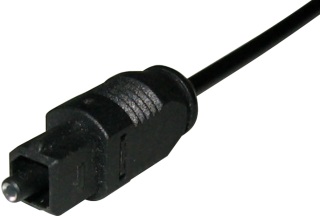
Optical SPDIF Connector After building a new HTPC I’ve discovered that the onboard IDT audio has a problem with the SPDIF output, or at least my Sony receiver has a problem with it! Every time a sound is played it causes the SPDIF input on the receiver to initialise which takes about 500 milliseconds, after the sound has finished the SPDIF goes back to sleep. As a result the first 500ms is lost off every sound that is played; not really a problem if you’re watching a movie but for applications that have little blips as you navigate around these sounds tend to get missed altogether; such is the case in MediaPortal the HTPC application I use.

My old motherboard with Nforce sound didn’t have this problem the SPDIF remained “active” all the time.

After much searching I did find a few other people with the same problem but no solution so I’ve written a small .NET application called SPDIFKeepAlive. It does just that. It sits in the system tray and continuously plays a silent wave file to keep SPDIF port active.
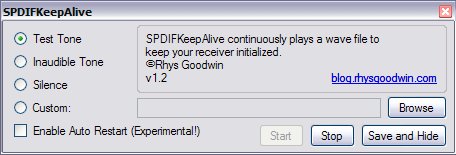
SPDIFKeepAlive Settings

Hope this is helpful for others, leave comments for bugs or if you want the source code.

Download

.NET Framework 2.0 Required

Version History

Version 1.2 (Current Version) – download

  • Fixed auto play on startup
  • Added auto-restart option

Version 1.1

  • Added new output options

Version 1.0

  • Initial release
  • Share/Bookmark

Subscribe to Comments

19 Responses to “SPDIF KeepAlive”

  1. Thank you for the 64bit update. Now working great in vista x64 sp1 with .dot net 3.5!

    Keep up the great work.

    Now if I could only find vista 64 bit drivers for the ps3 sixaxis controller id be set to use vista full time.


    Vampyre

  2. That’s exactly what I was looking for. However, I think I might have a canine ancestor, as I’m able to hear the inaudible tone. That happened to me before with other high frequency sounds people usually couldn’t hear. What frequency did you use? 20 KHz? Is it possible to use a higher one (and maybe also a lower volume)? Thanks in advance.


    RTonietto

  3. Hi, Can you try the test version, it has some options for output type. If it’s still not working I’ll dig the code out and have a look :)


    Rhys

  4. That’s the same version I was trying. I’ve noticed the 3 options: test, inaudible and silence. Obviosly, only the first 2 keep the output busy. But I can listen to both tones, even the high frequency of the inaudible one. I know it’s not common for humans to listen to frequencies above 16 KHz, but unfortunately that’s my case. I remember once when I made a step motor drive to use in a device and followed the component’s datasheet recommendation to use a frequency of 20 KHz, which would be inaudible for humans. The funny thing is that I was the only one who could listen to the high pitch buzz the machine emitted.


    RTonietto

  5. Okey, I’ll put up a new version soon with a new audio file. Maybe an option to specify your own .wav file so you can experiment. :)


    Rhys

  6. Ok new version (1.1) available now. New inaudible tone and option to select a custom wav file


    Rhys

  7. New version tested and it’s perfect now (for my ears at least ;D). I couldn’t hear the inaudible tone and any sound I play on my computer now is heard on the HT’s speakers without any delay. Thank you.


    RTonietto

  8. Downloading new version! Just reinstalled windows Glad I could find this website again.

    THANK YOU


    Vampyre

  9. Well only thing with 1.1 is that it wont auto start when then the startup menu.

    On the previous ones I would place it to start with windows. This one starts but you have to open it and then click start to get it going.

    If you could make a option to start what ever sound you choose when lauched I think it would be perfect!


    Vampyre

  10. Hmmm…Yeah good point. I’ll sort that out soon. :)


    Rhys

  11. Could the executable capture the parameters of output options so that the inaudible tone starts automatically at Windows start up?


    Eric

  12. Yeah sorry about this, I was meant to fix this ages ago. I’ll get to it soon. I’ll make sure it starts playing as soon as it starts. That’s how it used to work but I broke it in the last version!


    Rhys

  13. In Vista and above, you can have the audible tone running but set the mixer to reduce the volume output specifically by this program to zero. You won’t hear anything but the connection is still kept alive, and you can check on it anytime but raising the program’s volume output.

    Rhys – thanks btw for this excellent tool.


    Marcus

  14. “Yeah sorry about this, I was meant to fix this ages ago. I’ll get to it soon. I’ll make sure it starts playing as soon as it starts. That’s how it used to work but I broke it in the last version!”

    Any update? Program would then be perfect ;-)


    Vampyre

  15. Ok I’ve updated and finally fixed the startup problem! :)
    Version 1.2 now available


    Rhys

  16. [...] can download the new version at the bottom of the SPDIFKeepAlive Post Tags: Keepalive , sony unlock , SPDIF , spdif [...]

     
  17. Thank you, this saved me much frustration. However I found my receiver would still go to sleep at even the tiniest interval of silence with all of the settings except for “Test Tone”. The solution for me was to create a 20KHz wav file and use it as a custom file. Apparently my receiver has a lower end limit but not a higher end one. Thought this might help someone.


    Alessandro

  18. Juats wanted to say thank you! I was just about to code the same thing when I found your tool. Don’t have to do that now :)


    markus

  19. Thanks for this! Also thanks to Marcus for the tip, that works perfectly!

    It was a bit worse than described on my Xonar DX and Logitch Z-680′s in that it would pop or crackle each time the optical stream started up again… Yikes


    Benghis

Leave a Reply

Message: