
Deny yourself access to a Group Policy
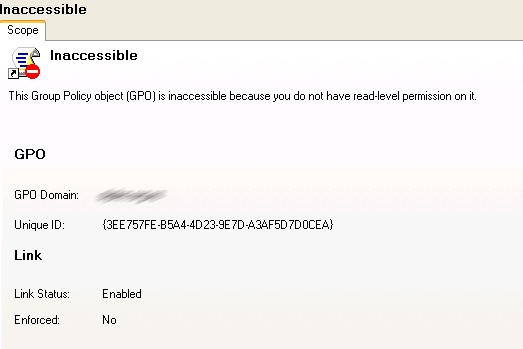
When clicking too fast you accidentally denied “Full Control” to “Authenticated Users” for a Group policy you were working on. Since deny takes precedence over allow the results are that you are now denied the ability edit the GPO at all. This includes editing permissions to remove the blundered Access control entry! In the Group Policy management console it Looks like this:
Components of a Group Policy Object
A GPO is made up of two parts; a set of files in sysvol and an Active Directory object. When correcting GPO permissions you must modify the ACL on the AD object using DSACLS (included in the w2k3 support tools) and the sysvol NTFS permission.
The following dsacls command will remove the offending deny ACE from the ACL, in this case “Authenticated Users” from the AD object. The object is named by the GUID that can be seen on the inaccessible object in the GPMC.
dsacls “cn={3EE757FE-B5A4-4D23-937D-A3AF5G7F0CEA}, cn=Policies, cn=System, dc=wordpress, dc=com“ /R “Authenticated Users”
If successful this command will return a full list of the permissions for the object
Next up you need to remove the deny ACE from the policy’s NTFS folder ACL. Again the GUID of the policy is used to name the folder:
\wordpreessSysvolwordpress.comPolicies{3EE757FE-B5A4-4D23-937D-A3AF5G7F0CEA}
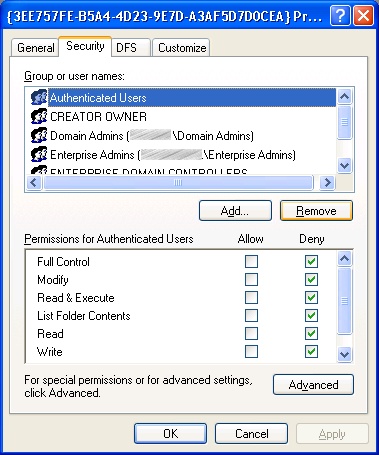
At this point your GPO will be accessible within the GPMC and the permissions will be consistent across AD and Sysvol. All that’s left to do is to add “Authenticated Users” back to the GPO. Do this by editing the GPO with the group policy editor; doing so will apply permission changes to both the AD object object and the Sysvol policy folder.
Just thought this might help someone, not that it’s ever happen to me! ;-p